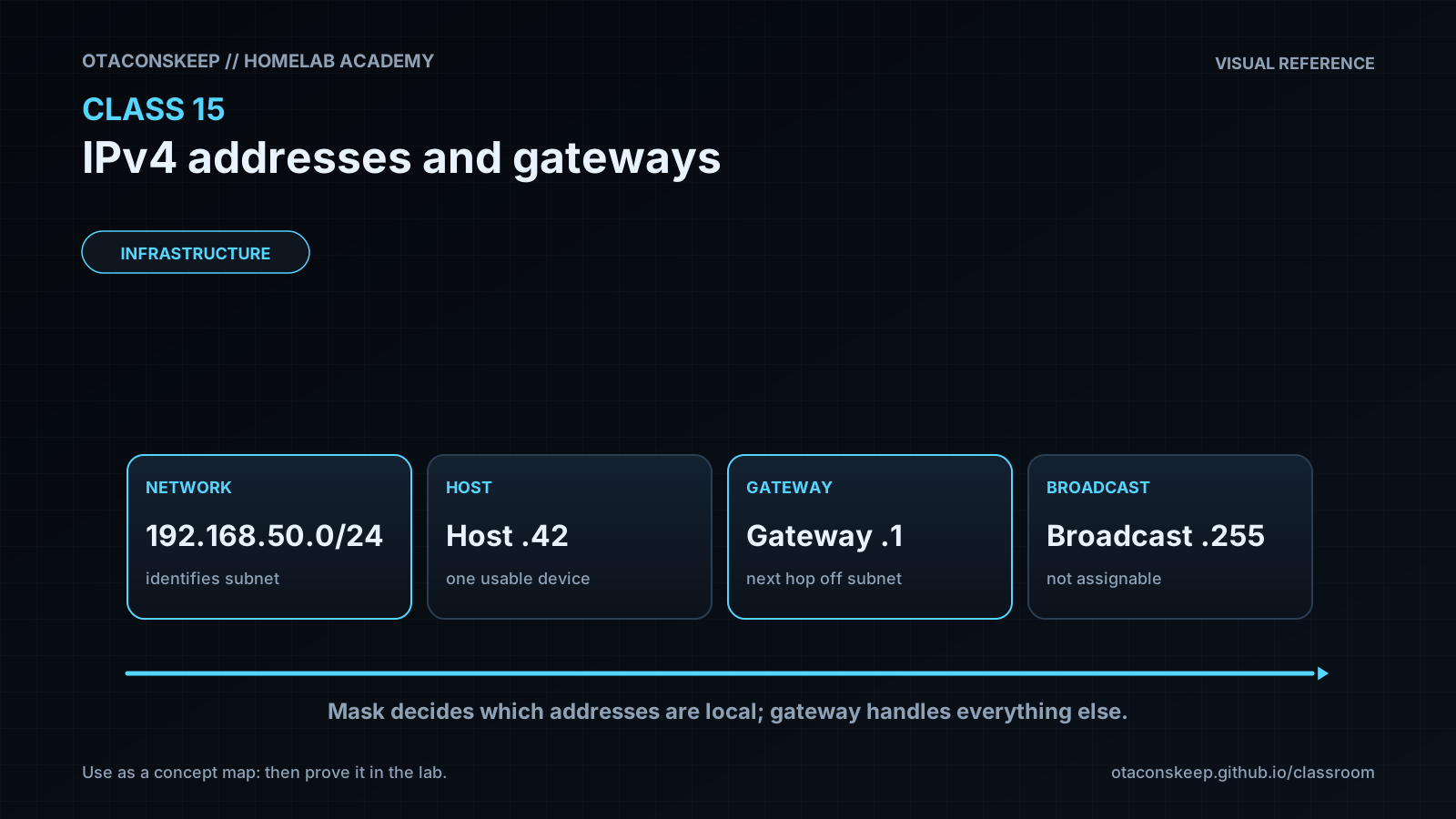
Overview
Module: Module 1: Infrastructure & Addressing
Topic: 05: IPv4 addresses & gateways
Activity type: Reading / reference (Learn)
Bloom focus: Understand / Apply
Links to outcome: Given a host, the learner can read IPv4 address, mask, and gateway; explain network vs host bits; contrast classful charts with classless /24 math; and decide same-LAN vs via-gateway delivery.
Why this matters
Every ‘why can’t these containers/hosts talk?’ ticket eventually becomes addressing. If you cannot read IP/mask/gateway, Docker and ARR networking stay superstition.
Vocabulary
| Term | Meaning |
|---|---|
| IPv4 address | Four decimal numbers (0–255) separated by dots that identify a host on an IP network |
| Octet | One of the four numbers in an IPv4 address (eight bits) |
| Subnet mask / netmask | Companion value that marks which part of the address is the network and which is the host |
| Default gateway | The router IP your host uses to leave its local network (LAN) |
| DHCP | Service (usually on your router) that automatically assigns IP, mask, gateway, and DNS |
| Network address | First address of a subnet, reserved; not for normal hosts (often ends in .0 on a /24) |
| Broadcast address | Last address of a subnet, reserved; talks to “everyone on this LAN” (often .255 on a /24) |
| Host | A device with an IP: PC, phone, VM, AP, camera, printer… |
| Private address | Ranges used inside homes/labs (not routed on the public Internet as global uniques), e.g. 192.168.0.0/16 |
/24 |
Shorthand for mask 255.255.255.0 (first three octets = network on common home LANs) |
| Classful addressing | Historic A/B/C scheme: first octet range implied a default mask and therefore a fixed “huge / medium / small” network size |
| Classless addressing | Modern practice: choose any valid mask (CIDR) that fits the hosts you need, defaults are history, not law |
| IANA | Internet Assigned Numbers Authority, the top allocator of public IP space (regions and operators get slices under it) |
| Loopback | Special addresses starting with 127 that talk to this host only (classic test: 127.0.0.1) |
| Multicast (Class D) | One-to-many delivery addresses (224–239); not for ordinary host assignment |
| Ping | ICMP echo request/reply, “are you reachable?”, everyday reachability check |
Core reading
Originally: What you will learn
You will understand what an IPv4 address is for, how to read it on Windows and Linux, what the subnet mask and default gateway do, how DHCP usually hands out addresses at home, and how a device decides “same street / hand it over” versus “call the router.” You will see why IPv4’s roughly 4.3 billion addresses felt endless in 1983 and why classful allocation (A/B/C plus reserved D/E and loopback) burned through that pool too fast. You will practice a beginner subnet-reading hack that covers most home and small-lab /24 networks, contrast classful defaults with classless masks you actually use, and prove loopback with ping, then you will prove it with commands, not vibes.
What an IP address is for
Devices do not share pictures, API calls, or Netflix streams by shouting into the air. They send packets to a destination identity. On almost every LAN and on the Internet today, that identity is an IP address.
Think of it as a mailing address for packets, not a phone contact name. Without an address (or an equivalent layer-3 identity), the stack has nowhere to deliver the reply.
Your watch, phone, NAS, Proxmox node, and Docker host each need one when they participate in IP networking. That is why “everything got an IP” feels magical, and why broken addressing feels like the whole lab fell over.
Meet the three friends on your NIC
When you inspect a typical IPv4 interface you see a trio:
| Field | Job |
|---|---|
| IPv4 address | “Who am I on this network?” |
| Subnet mask | “Which part of my address is the street name, and which is my house number?” |
| Default gateway | “Who do I ask when the destination is not on my street?” |
Ignore the word “IPv4” panic for now, this class is about the dotted-decimal addresses most labs still use first. IPv6 exists and matters; you will meet it later without throwing away these skills.
How to find your address (every platform)
Windows (CMD or PowerShell):
ipconfig
Look for IPv4 Address, Subnet Mask, and Default Gateway on the active Wi-Fi or Ethernet adapter.
Linux / macOS:
ip -br addr
ip route
# older alias still seen in docs:
ifconfig
Phone: Settings → Wi-Fi → tap the connected network → IP address / Router / Subnet (labels vary).
Write all three values in the workbook for the machine you use for Academy labs.
Who handed you that number?
On most home and small-lab Wi-Fi, you did not invent 192.168.1.42. Your router (or a dedicated DHCP server) offered it through DHCP when the interface came up: “Here is an address, here is the mask, here is the gateway, here is DNS.”
You can also set a static address, common for Proxmox, n8n, and NAS, so the number does not drift after a reboot. Static still must obey the same mask and stay unique on the LAN.
Bad or conflicting addresses (two hosts claiming the same IP, or a mask that lies) break “magic” fast. Diagnosis starts by reading the trio, not by reinstalling Docker.
Why so many homes look like `192.168.1.x`
Many consumer routers ship DHCP pools in private space such as 192.168.1.0/24 or 192.168.0.0/24. That is a convention and a private-range choice, not destiny. Your lab might use 10.0.0.0/24 or 172.16.0.0/24. The mask tells the truth about what “your street” is, not the brand of the router.
The beginner subnet-mask hack (covers most `/24` labs)
A mask has four octets too. Line them up under the IP:
IP: 192.168.  1.  42
Mask: 255.255.255.   0
Hack you can use today
- Where the mask shows 255, that octet is part of the network (street name), it stays the same for every normal host on this subnet.
- Where the mask shows 0, that octet is in the host portion (house number), it changes per device.
So with 255.255.255.0, every host on that LAN shares the first three octets (192.168.1) and differs in the last (42, 17, 200, …).
Deeper binary subnetting (non-255/0 borders, VLSM, summarization) comes in later Academy networking work. This hack is the on-ramp that unlocks home labs and CCNA-style first chapters without drowning you on day one.
Same street vs call the gateway
Street analogy (sanitized): the network portion is the street name; the host portion is the house number. Delivering coffee to a neighbor on the same street is a local walk. Delivering to another city needs a courier, the default gateway.
On the wire:
- Host A wants Host B’s IP.
- A applies the mask: “Is B on my network?”
- Yes → deliver on the LAN (ARP/ND, switch, Wi-Fi AP, details aside).
- No → send to the default gateway; the router forwards toward the remote network (including “the Internet”).
Netflix, public DNS, and 1.1.1.1 are almost never on your 192.168.1.0/24. Your laptop notices and uses the gateway. Talking to your NAS on 192.168.1.50 from 192.168.1.42 with mask 255.255.255.0 stays local.
How many usable addresses on a simple `/24`?
With mask 255.255.255.0, the last octet can be 0–255 → 256 numeric values.
Two are reserved on that subnet:
| Address | Role |
|---|---|
First (e.g. 192.168.1.0) |
Network address, do not assign to a host |
Last (e.g. 192.168.1.255) |
Broadcast, do not assign to a host |
That leaves 254 theoretically assignable host addresses. In practice your gateway usually consumes one (e.g. .1), so a typical home pool might offer roughly 253 for phones, PCs, and IoT, exact DHCP pool size is a router setting.
If you answered “256” on the challenge, you counted reserved addresses. If you answered “254,” you remembered network + broadcast. If you answered “253,” you also subtracted a typical gateway. Write which model you used in the workbook.
Why ~4.3 billion felt endless, and then did not
IPv4 uses 32 bits. That is 2³² = 4,294,967,296 possible values, about 4.3 billion. When the modern Internet’s addressing era is dated to 1 January 1983, that number looked absurdly large. Two things the early designers could not fully price in:
- The Internet became a global utility, not a research curiosity.
- Nearly everything gained a network stack, phones, cameras, VMs, containers, IoT, not “a few computers per site.”
Public IPv4 free-pool exhaustion is real. Later classes cover the operational bandaids (private addressing + NAT, CIDR, and IPv6). This section is about the first design choice that made scarcity arrive early: classful chunking.
Classful ranges (A–E): what exams still expect you to know
Early IPv4 organized public space into classes. For Classes A/B/C, the first octet told you the default subnet mask, and therefore how many hosts that “network” assumed.
| Class | First-octet range (decimal) | Default mask | Rough idea |
|---|---|---|---|
| A | 1–126 |
255.0.0.0 (/8) |
Few networks, huge host space (~16.7M addresses each) |
| B | 128–191 |
255.255.0.0 (/16) |
Medium networks (~65K addresses each) |
| C | 192–223 |
255.255.255.0 (/24) |
Many networks, small host space (256 addresses each, then subtract reserved) |
| D | 224–239 |
(no host default) | Multicast, not for ordinary unicast host assignment |
| E | 240–255 |
(no host default) | Reserved / experimental, do not assign to normal hosts |
Gap to notice: Class A stops at 126, Class B starts at 128. 127 is missing on purpose, that is the loopback block (next section), not a Class A for you to hand out.
Default-mask math with the 255/0 hack
- Class A
10.0.0.0with255.0.0.0→ only the first octet is locked → three host octets → on the order of 16 million addresses in that default classful network (far larger than any home LAN). - Class B
172.16.0.0with255.255.0.0→ first two octets locked → about 65,534 usable hosts if you stayed classful (still enormous for a single flat LAN). - Class C
192.168.1.0with255.255.255.0→ first three octets locked → the familiar 254 usable-host story from earlier.
Historically, large organizations received entire Class A (/8) blocks because planners assumed “plenty left.” Many of those blocks were later subnetted into smaller pieces. The registry that sits at the top of public allocation is IANA (with Regional Internet Registries below it). You do not need their org chart for this class, you need the idea: big default chunks were easy to give away and hard to claw back.
Memorize the chart if you are exam-bound. In the lab, treat defaults as history, not as how your home router must be configured.
Classful vs classless (your first honest look at “subnetting”)
Classful means: “This first octet says I am Class A, so my default mask is /8.”
Classless means: “I own (or privately use) a block, and I pick a longer mask to carve smaller networks.” Example:
Allocated / classful view: 10.0.0.0     mask 255.0.0.0     (/8)
One slice you actually use: 10.7.1.0     mask 255.255.255.0 (/24)
The address still looks Class A by first octet, but the mask 255.255.255.0 makes a normal-sized LAN. That is a classless network: you broke the default. Modern practice is almost all classless (CIDR). Classful defaults still matter for reading old docs and exam questions.
Subnetting deeper (borrowing host bits, VLSM, summarization) is the next skill layer. This class only needs: mask decides size; class letter is a default, not a prison.
Class D and E: addresses you do not assign to laptops
- Class D (
224–239): multicast. Important for many protocols; not for “give this to my NAS as its main IP.” - Class E (
240–255): reserved/experimental space. Treat as off-limits for normal host addressing in this Academy.
Together with loopback and other special ranges, they are why “4.3 billion total” is not the same as “4.3 billion free for random devices.”
Loopback: `127` talks to this host only
Anything whose first octet is 127 is loopback: traffic stays on the local host. The classic address is 127.0.0.1 (also nicknamed localhost).
Why it exists: prove the IP stack on this machine is alive without involving Wi-Fi, a switch, or the Internet.
Ping sends an ICMP echo and waits for a reply, “are you there?” It is the most common first reachability tool in IT.
ping -n 4 127.0.0.1
# Same idea: any 127.x.x.x should answer locally on a healthy stack:
ping -n 2 127.15.15.8
ping -c 4 127.0.0.1
# Same idea: any 127.x.x.x should answer locally on a healthy stack:
ping -c 2 127.15.15.8
If 127.0.0.1 fails, fix the local OS/network stack before blaming Netflix or your gateway.
Design critique (for exams and interviews): the whole 127.0.0.0/8 block is reserved for loopback, about 16 million addresses, while day-to-day testing almost always uses .1. You still must recognize the range; do not assign 127.x to a lab VM as if it were a LAN address.
Private vs public (one careful sentence)
Addresses like 192.168.x.x, 10.x.x.x, and many 172.16–31.x.x are private. Your router translates when you browse the public Internet. Your “what’s my IP” website shows a public address on the WAN side, not the 192.168 on your laptop. Both matter; do not confuse them when debugging port forwards or tunnels (Class 10). Private space plus NAT is one of the operational bandaids that stretched IPv4 after classful giveaways and Internet growth; IPv6 is the long-term enlargement of the address space.
Worked example (study this)
I do: study the reasoning, not just the final answer.
Bad explanation: “They’re on Wi-Fi so they can talk.”
Better: Compare address and mask; compute network ID; if same network → local delivery; else → send to gateway. Separate loopback and reserved ranges from LAN addresses.
Windows/macOS/Linux UI labels move; ip is preferred over ifconfig on modern Linux. Masks may appear as CIDR (/24) in some tools, same idea as 255.255.255.0. Consumer Wi-Fi “smart” features can hide raw fields behind “Automatic.” Classful A/B/C defaults are exam and history literacy, production networks are classless/CIDR. Public IPv4 scarcity is managed with private ranges, NAT, careful allocation, and IPv6, not by pretending 1980s class sizes still match every site. Prefer official OS networking docs and IANA/RIR special-purpose address registries for exact reserved ranges; the durable skills are the trio, the 255/0 reading hack, local vs gateway decision, reserved addresses, class chart literacy, and loopback testing.
Next
- Open the Lesson for prior-knowledge check, guided practice, and required Feynman teach-back.
- Then complete Lab, Homework, and Quiz for this topic.