OmniRoute
Chooses where this request goes among providers and models.
OtaconsKeep Stateful AI Orchestration
OmniRoute routes a request. KeepRoute owns the mission. When Claude hits a limit, OmniRoute can switch models, KeepRoute can keep the same job alive with checkpoints, remaining work, and a handoff to another agent so you are not copy-pasting progress by hand.
We did not invent OmniRoute. It is the excellent upstream routing gateway. KeepRoute is OtaconsKeep’s layer on top, built because long agent work kept dying when a single provider failed.
Why KeepRoute was made
People already had a great way to send chat to many AIs. What kept breaking real Keep workflows was not “pick a model”, it was losing the job when that model hit a wall.
Chooses where this request goes among providers and models.
Owns the whole job, watches it, checkpoints it, and continues it if the AI has to change.
A coding session would be halfway done. Claude hit quota. Or Cursor stalled. Or the host rebooted. Stock routing can send the next prompt somewhere else, but the human still had to rebuild context: what finished, what failed, what files mattered, what not to do twice.
You should, KeepRoute does. OmniRoute is the traffic director. KeepRoute is mission control. Without KeepRoute you still have excellent fallback between models. With KeepRoute the job itself has an ID, memory, and a recovery path.
Trivial “hi” burning paid tokens. Clients each inventing their own routing rules. Starting over after a recoverable failure. Replaying a destructive step because the new agent did not know it already ran.
The mission is the product. The model is replaceable. KeepRoute exists so OtaconsKeep can treat Claude, Codex, Cursor, Grok, and Local as executors, not as the owner of your work.
See the UI
Screenshots from the live KeepRoute field UI, the same surface operators use on OtaconsKeep. Neon terminal look, Auto routing, providers on the left, answers on the right.
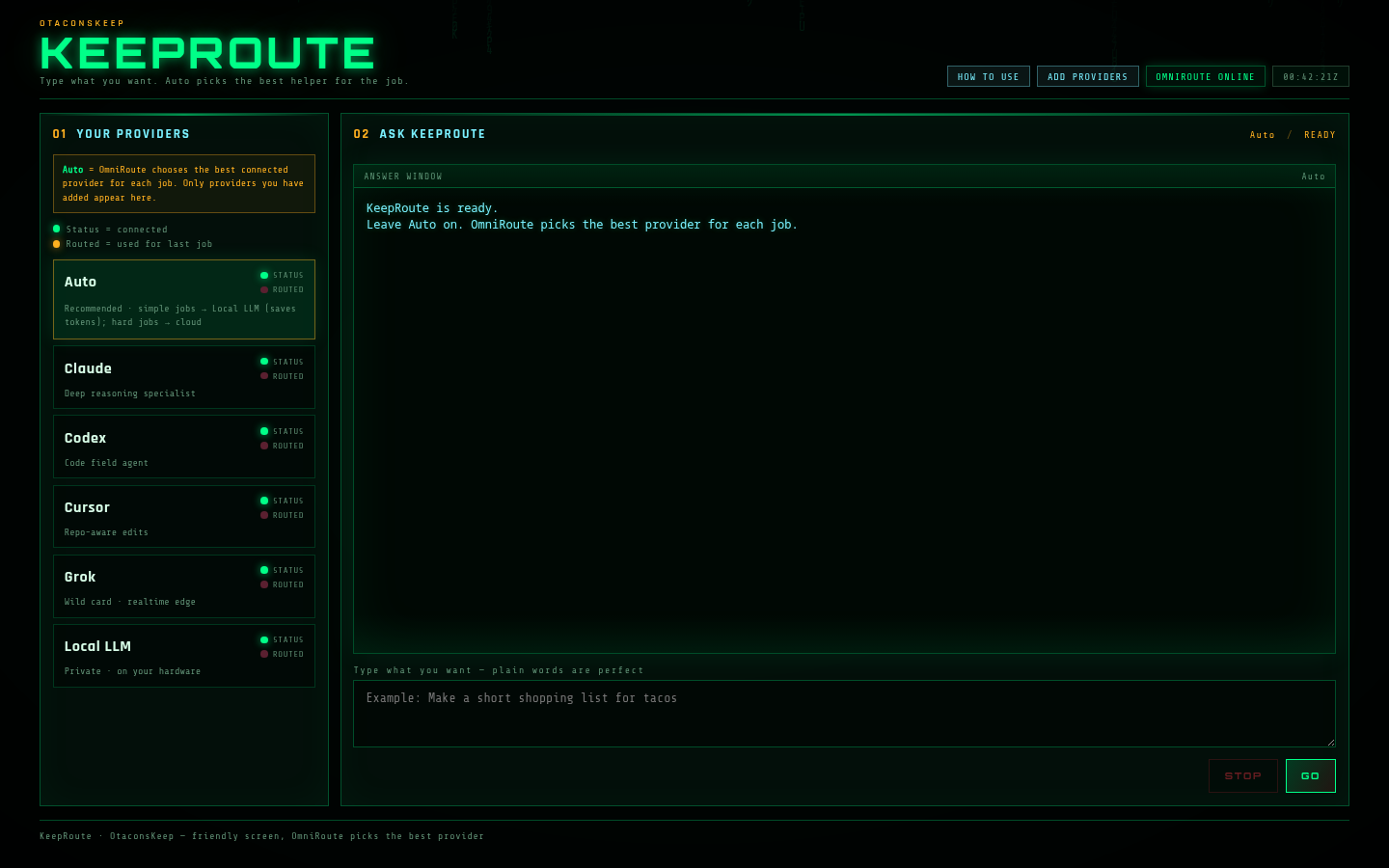
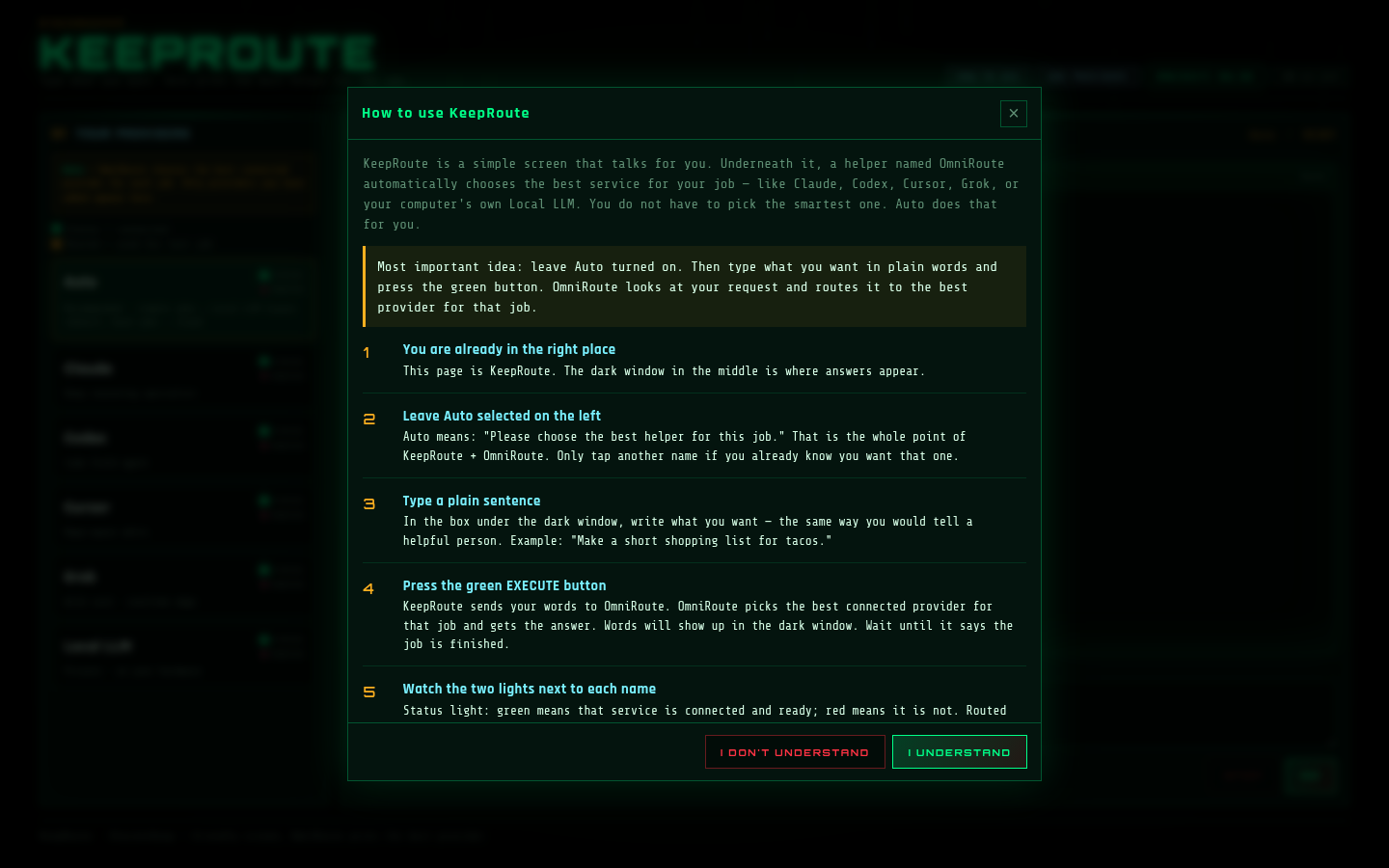
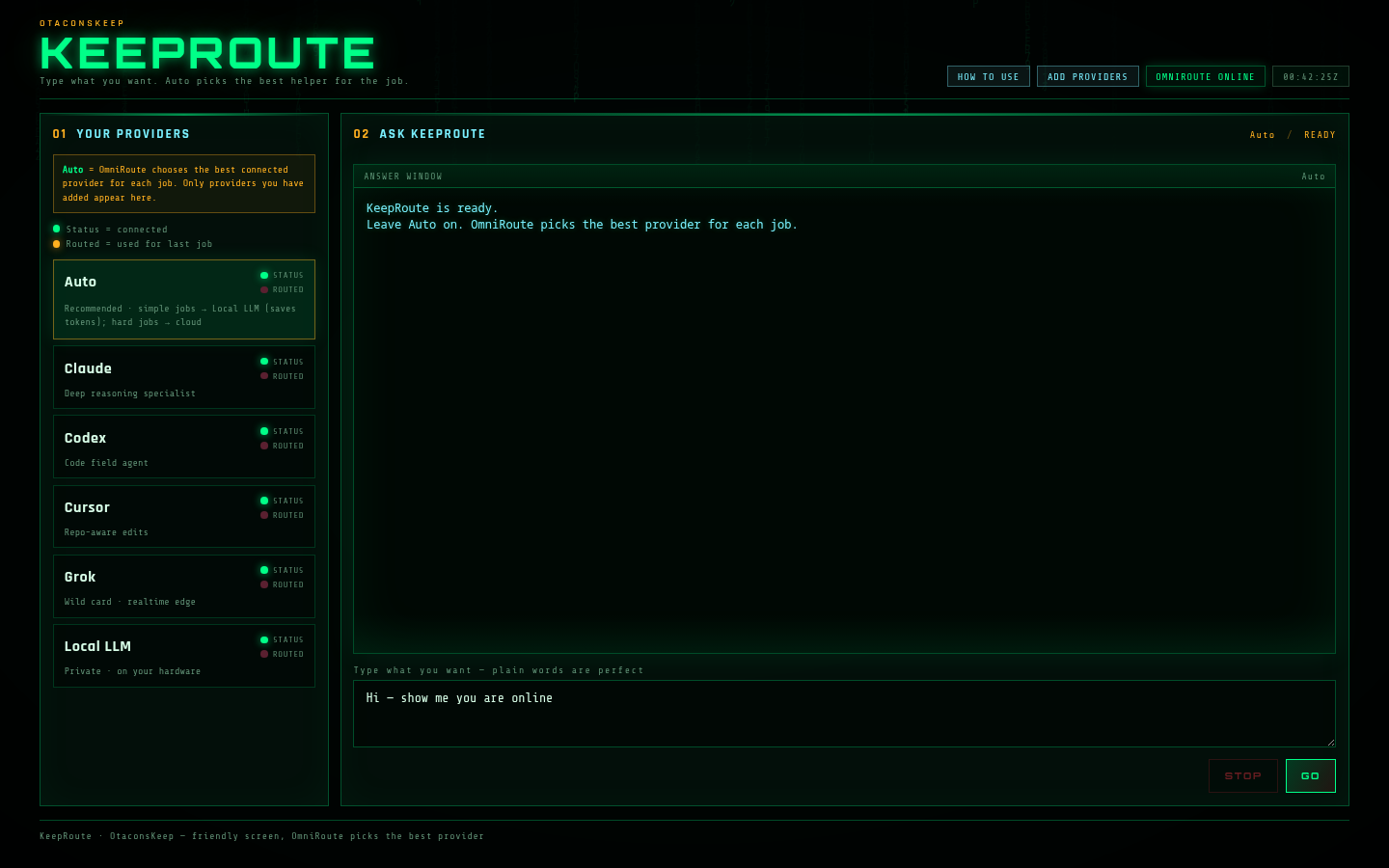
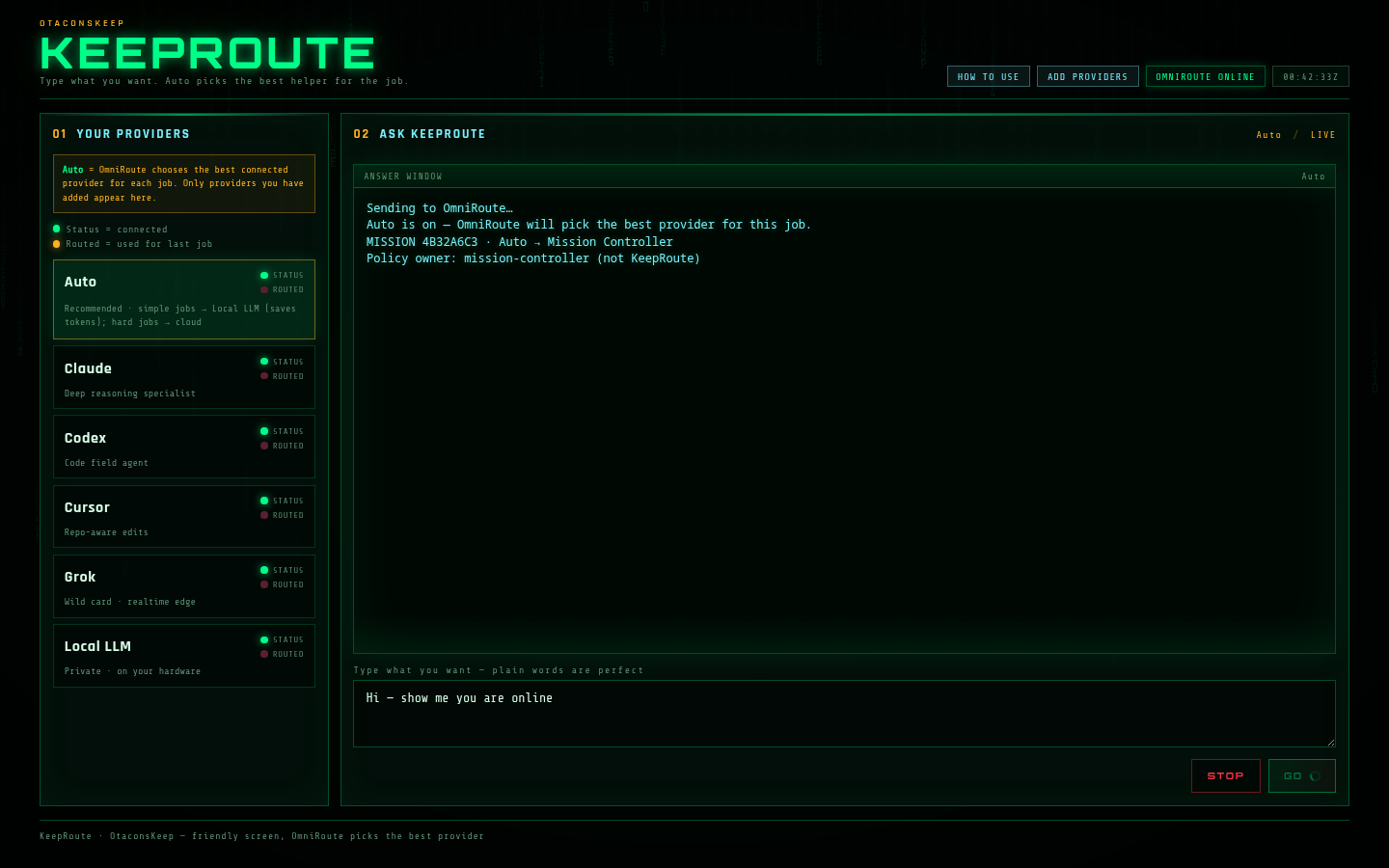
Screenshots sanitized for public use (no API keys, no private LAN addresses). Click any image for full size.
Where KeepRoute fits
So you always know what is ours, what is upstream, and what the larger Keep is.
What does it actually do?
You tell the system what you want done. It chooses an appropriate AI or local model. If that provider hits a limit, crashes, or becomes unavailable, the job can continue through another compatible agent, without making you start over.
This does not mean every provider or every task is guaranteed to hand off perfectly. Handoff quality still depends on tool compatibility and what the mission has saved.
If needed again: Codex → failure → Cursor → same mission continues. Completed work, remaining tasks, errors, and files travel with the mission, not private “hidden reasoning” from the previous model.
Why this design exists
Quotas, rate limits, outages, context limits, different strengths, different tools. KeepRoute separates the mission from the provider. The job belongs to the orchestration layer, not to Claude, Codex, Cursor, Grok, or any single model.
That means the system can choose the right executor, preserve progress, and move the mission when conditions change.
What did KeepRoute improve?
Long-running work gets a persistent Mission ID and state instead of living only inside one model call.
Clients no longer secretly choose providers. One orchestration layer owns routing policy.
Rate limits, quota issues, timeouts, and supported runtime failures can trigger controlled recovery instead of forcing a restart.
Not merely retrying a prompt elsewhere, completed work, errors, checkpoints, files, and remaining tasks can be preserved.
A mission can outlive the individual AI currently performing it.
Simple requests can stay local instead of unnecessarily consuming paid-provider usage.
Persistent state allows supported missions to survive service restart and validated host reboot recovery.
Project REX · latest advancement
Traced end-to-end on the operator Keep, then clean-room productized into Otacon Expansion Premium (v1.3.2+): every KeepRoute / OmniRoute exchange can record into a shared learning pool. A world-model rebuild turns those records into risks, domain insights, and proposal sources. Project REX treats world_model:* as a first-class proposal source: same board pipeline as other REX work. That is aiding and driving R&D: routing outcomes become durable signal, not a disposable log line.
OmniRoute moves the request. KeepRoute owns the mission. Learning records the outcome. The world model summarizes it. REX can spawn or rank work from that summary: including KeepRoute-domain risks and low-confidence route patterns.
The learning store and world model are one shared pool per install (Keep or Expansion), tagged by domain (for example keeproute). Tags filter; they do not wall off memory. Agents and REX draw from the same pool whether the exchange came from Claude, Codex, Cursor, Grok, or local Ollama through KeepRoute.
Failed pre-flight / route attempts become risk signal. Successful exchanges after a fix dilute stale failure weight as fresher records accumulate. That is the practical “smarter over time” loop: success and failure both teach the board.
KeepRoute 1.0 public = mission orchestration on OmniRoute, plus an optional fail-open POST into Expansion when OTACON_EXPANSION_URL (or vault expansion_url) is set. Otacon Expansion Premium v1.3.2+ ships route_learning, world_model, and REX autonomy that consumes world_model:* proposals: the same loop as the operator Keep, clean-room for public installs.
| Capability | Operator Keep (live) | Public KeepRoute 1.0 | Public Expansion / Premium |
|---|---|---|---|
| OmniRoute routing + KeepRoute missions | Yes | Yes | Pairs via KeepRoute install |
| Exchange → shared learning records | Yes (global pool) | Optional POST into Expansion | Yes: route_learning (v1.3.2+) |
| World model rebuild (risks / insights) | Yes | Via Expansion when wired | Yes: world_model |
| REX consumes world_model:* proposals | Yes | Via Expansion when wired | Yes: autonomy detect tick |
| Scope | Global per Keep | Mission UI + optional Expansion feed | Global per Expansion install |
No private Keep memories, hostnames, or live risk text are published here: architecture and install honesty only.
Before / after
Conceptual product architecture only. No internal network topology is shown.
OmniRoute vs KeepRoute
OmniRoute is the upstream routing data plane: pick a provider, fall back, stay healthy. KeepRoute was built because that was not enough for long Keep missions, when the model died, the work still died with it. KeepRoute sits on OmniRoute and adds mission state so the job can continue.
We do not claim stock OmniRoute is “bad.” Stock column verified against public OmniRoute docs. Where stock has no mission-orchestration equivalent, we say so plainly.
| Capability | Stock OmniRoute | KeepRoute 1.0 |
|---|---|---|
| Multiple providers / models | Yes | Uses OmniRoute |
| Provider / model routing | Yes | Uses OmniRoute |
| Provider fallback / combos | Yes | Uses OmniRoute + mission-aware recovery |
| Health / circuit handling | Yes | Uses OmniRoute resilience + KeepRoute supervision |
| Policy-based task classification | Not KeepRoute-style mission policy | Yes |
| Persistent Mission ID | No equivalent mission layer | Yes |
| Persistent mission state | No equivalent mission layer | Yes |
| Checkpoints | Not core stock routing | Yes |
| Completed / remaining work tracking | No equivalent | Yes |
| Unresolved-error preservation | No equivalent | Yes |
| Route history (mission-level) | Request/usage telemetry ≠ mission history | Yes |
| Service restart recovery | No mission-level equivalent | Yes (tested) |
| Full-host reboot recovery | No mission-level equivalent | Yes (verified 2/2 in KeepRoute testing) |
| Stateful model continuation | Fallback ≠ mission continuation package | Yes |
| Cross-agent runtime handoff | No | Yes, supported/tested paths |
| Claude Code → Codex continuation | No | Yes, supported/tested path |
| Multi-hop continuation | No mission multi-hop | Yes |
| Duplicate / destructive action protection | No mission ledger equivalent | Yes |
| Local-first trivial routing | Configurable routing | Policy-enforced local-first for trivial work |
| Operational mission metrics / release gate | Gateway monitoring | Mission soak metrics + release verification |
Sources: upstream OmniRoute README / Architecture / Resilience Guide (public GitHub). KeepRoute column = OtaconsKeep 1.0 release capabilities.
Why OmniRoute · why not Jev
OmniRoute and Jev both get mentioned in “AI routing” conversations, but they solve different problems. KeepRoute needs a local multi-provider data plane that Claude, Codex, Cursor, Grok, and Ollama can actually talk to. Jev is a typed decision / judgment layer (TypeSafe AI) that scores complexity, gates tool calls, and advises which model tier to use, usually via cloud gateway or MCP. Useful elsewhere. Wrong job for KeepRoute’s foundation.
A real data plane on 127.0.0.1: providers connected once, Auto routing, fallbacks when Claude hits quota, local models for cheap work. KeepRoute’s Mission Controller sits on top of that plane. Without a gateway like OmniRoute, there is nothing durable to hand a mission to when the executor changes.
Jev answers typed questions: next step, risk, model tier, tool allow/block. It does not run your Claude/Codex/Cursor sessions, hold provider API keys on your LAN, or expose an OpenAI-compatible proxy your Keep UI can stream through. It is middleware advice, not the traffic pipe KeepRoute wraps.
Local-first and offline-capable. Provider keys and routing stay on your machine. No waitlist for the core path. Works with the same agent CLIs OtaconsKeep already uses. Open source, Docker-friendly, and already proven under KeepRoute’s soak tests. Jev still needs a host model and usually a cloud gateway bill for the judgments themselves.
Yes, in theory. You could ask Jev “is this turn deep enough for Opus?” while OmniRoute still carries the request. That does not replace OmniRoute. KeepRoute’s bet is mission continuity on a self-hosted gateway, not outsourcing every routing judgment to a third-party decision model.
| Question | Jev | OmniRoute | KeepRoute (on OmniRoute) |
|---|---|---|---|
| Primary job | Typed decisions / judgments | Provider & model traffic routing | Mission state, checkpoints, handoff |
| Where it runs | Cloud gateway / MCP client | Local (self-hosted) | Local, on OmniRoute |
| Holds provider keys for Claude / Codex / … | No (advice only) | Yes | Uses OmniRoute |
| OpenAI-compatible proxy for CLIs / UI | No | Yes | Uses OmniRoute |
| Fallback when a provider fails | Can suggest a tier | Yes (gateway) | Yes + mission continuation |
| Persistent Mission ID / checkpoints | No | No | Yes |
| Fits OtaconsKeep local-first rule | Cloud-centric by default | Yes | Yes |
Jev description based on public TypeSafe / Vercel AI Gateway / OpenRouter listings. OmniRoute based on upstream public docs. Neither product is “bad”; they are different layers.
Why it helps this use case
The mission exists independently from a single model request.
Recoverable provider failures do not necessarily require starting again.
A coding mission can move between supported agent runtimes.
Simple work can remain local.
Important mission state can survive service interruption.
Routing decisions are controlled by one orchestration layer rather than scattered through clients.
You can inspect what route was selected and why.
Centralized routing ownership, durable checkpoints, failure taxonomy, adapters, local-first policy, restart recovery, and evidence-driven releases.
Project REX · latest advancement
Traced end-to-end on the operator Keep, then clean-room productized into Otacon Expansion Premium (v1.3.2+): every KeepRoute / OmniRoute exchange can record into a shared learning pool. A world-model rebuild turns those records into risks, domain insights, and proposal sources. Project REX treats world_model:* as a first-class proposal source: same board pipeline as other REX work. That is aiding and driving R&D: routing outcomes become durable signal, not a disposable log line.
OmniRoute moves the request. KeepRoute owns the mission. Learning records the outcome. The world model summarizes it. REX can spawn or rank work from that summary: including KeepRoute-domain risks and low-confidence route patterns.
The learning store and world model are one shared pool per install (Keep or Expansion), tagged by domain (for example keeproute). Tags filter; they do not wall off memory. Agents and REX draw from the same pool whether the exchange came from Claude, Codex, Cursor, Grok, or local Ollama through KeepRoute.
Failed pre-flight / route attempts become risk signal. Successful exchanges after a fix dilute stale failure weight as fresher records accumulate. That is the practical “smarter over time” loop: success and failure both teach the board.
KeepRoute 1.0 public = mission orchestration on OmniRoute, plus an optional fail-open POST into Expansion when OTACON_EXPANSION_URL (or vault expansion_url) is set. Otacon Expansion Premium v1.3.2+ ships route_learning, world_model, and REX autonomy that consumes world_model:* proposals: the same loop as the operator Keep, clean-room for public installs.
| Capability | Operator Keep (live) | Public KeepRoute 1.0 | Public Expansion / Premium |
|---|---|---|---|
| OmniRoute routing + KeepRoute missions | Yes | Yes | Pairs via KeepRoute install |
| Exchange → shared learning records | Yes (global pool) | Optional POST into Expansion | Yes: route_learning (v1.3.2+) |
| World model rebuild (risks / insights) | Yes | Via Expansion when wired | Yes: world_model |
| REX consumes world_model:* proposals | Yes | Via Expansion when wired | Yes: autonomy detect tick |
| Scope | Global per Keep | Mission UI + optional Expansion feed | Global per Expansion install |
No private Keep memories, hostnames, or live risk text are published here: architecture and install honesty only.
Benchmarks // verified release results
These are observed release-test results, not universal guarantees. Sample sizes are shown beside every rate. Registered in Engineering as KR-001–KR-009 with evidence EVID-KR-001.
Security / privacy
We do not claim “everything is encrypted.” Public static website assets are not part of an encryption-at-rest story. Below is an honest control map for KeepRoute deployments.
API keys and provider secrets must not be shipped to the browser or embedded in public pages.
Internal routing data-plane services are intended for private/local binding, not for casual public exposure.
This site publishes aggregate release results only. No raw mission payloads, logs, or credentials.
Static HTML/CSS/JS for this page contain no API keys, tokens, or private remotes.
Full-disk / field-level encryption of every mission record is not claimed as a verified KeepRoute 1.0 guarantee.
Operators should apply their own backup encryption. KeepRoute 1.0 does not advertise a verified universal backup-crypto product feature.
Use TLS wherever traffic crosses an exposed network. Local-only installs may use loopback without public TLS, that is a deployment choice, not a magic shield.
Administrative APIs and dashboards should be authenticated and not published as open internet endpoints.
If a control is marked Not verified, we will not market it as finished. Prefer honest gaps over false confidence.
Pros & cons
Limitations
Install // Free
KeepRoute is free. No supporter vault, no license key, no Buy Me a Coffee seat. No one-click Setup yet: you install the same KeepRoute field UI we run on OtaconsKeep hardware, on your machine. Do it in two parts: 1) check prerequisites (click any tool you do not have yet), then 2) follow the numbered install steps.
Click a row if you do not have that tool yet. Each row opens baby-step install help. When every Required row is done, go to Part 2.
mkdir -p ~/keeproute
cd ~/keeproute
pwd
You should see a path like /home/YOURNAME/keeproute.
Skip this entire row if you already use Linux.
wsl --install -d Ubuntu
sudo apt update
sudo apt upgrade -y
uname -aYou should see Linux in the output.
python3 --versionNeed 3.10 or newer (3.11 / 3.12 is fine). If the command is “not found”, continue.
sudo apt update
sudo apt install -y python3 python3-venv python3-pip
python3 --versionExample good output: Python 3.12.3.
python3 -m pip --version
sudo apt update
sudo apt install -y python3-pip
python3 -m pip install --user --upgrade pip
python3 -m pip install --user flaskIf you see a PATH warning about ~/.local/bin, that is normal; KeepRoute still runs with python3 desk/app.py.
docker --version
docker compose version
Both should print a version. If either fails, continue.
sudo apt update
sudo apt install -y docker.io docker-compose-v2
On some systems the Compose plugin is docker-compose-plugin. Either is fine as long as docker compose works.
sudo usermod -aG docker "$USER"Then log out and log back in (WSL: close Ubuntu and open it again). New groups only apply after a fresh login.
sudo service docker start
# or on systemd hosts:
sudo systemctl enable --now docker
docker run --rm hello-worldYou should see a “Hello from Docker!” message.
unzip -v | head -1
curl --version | head -1
sudo apt update
sudo apt install -y unzip curl
Skip if you will only use cloud providers (Claude, OpenAI, etc.). No GPU? Cloud-only is fine.
ollama pull qwen2.5:3b
ollama run qwen2.5:3b "Say hi in one short sentence."
When the Required rows are done, continue to Part 2 · Install steps.
mkdir -p ~/keeproute
cd ~/keeproute
# If the zip landed in Downloads (Linux / WSL):
unzip -o ~/Downloads/KeepRoute-UI.zip
# WSL tip: Windows Downloads is often:
# unzip -o /mnt/c/Users/YOUR_WINDOWS_USER/Downloads/KeepRoute-UI.zip
ls
cd ~/keeproute/KeepRoute-UI
# If the unzip created a nested folder name, cd into whatever ls showed.
pwd
ls
export OMNIROUTE_INITIAL_PASSWORD='pick-a-strong-password'
docker compose -f docker-compose.omniroute.yml up -d
docker ps | grep -i omniYou should see a running container line. If not, scroll to If something fails.
python3 -m pip install --user flask
mkdir -p desk/state
echo '{}' > desk/state/credentials.json
chmod 600 desk/state/credentials.json
export OMNIROUTE_HOST=http://127.0.0.1:20127
export OMNIROUTE_DESK_PORT=20129
export OMNIROUTE_DESK_BIND=127.0.0.1
python3 desk/app.py
http://127.0.0.1:20129/
You should see the KEEPROUTE screen (providers on the left, ask box on the right).Never paste API keys into Discord, email, or this website. Keys stay on your computer inside KeepRoute / OmniRoute.
export MISSION_CONTROLLER_URL=http://127.0.0.1:20130Auto policy is owned by Mission Controller when that service is present.
cd ~/keeproute/KeepRoute-UI
docker compose -f docker-compose.omniroute.yml down
Page won’t open: confirm python3 desk/app.py is still running and you used 127.0.0.1:20129.
Providers missing: connect them in OmniRoute first, save the OmniRoute API key in KeepRoute, then refresh the page.
Docker errors: go back to Docker baby steps, log out/in after adding the docker group, then retry docker compose … up -d.
python3 / pip missing: Python · pip.
unzip failed: unzip / curl.
Local AI silent: no GPU / no Ollama is fine, use cloud providers; Local is optional (Ollama steps).
Release
FAQ
OmniRoute routes a request. KeepRoute owns the mission. We built KeepRoute because long agent jobs kept dying when Claude hit a limit, a provider failed, or the host restarted. Stock routing can send the next prompt elsewhere, KeepRoute checkpoints the job and continues it so you are not rebuilding progress by hand.
Yes, github.com/Otaconskeep/KeepRoute has the full product write-up, INSTALL.md how-to, WHY doc, and the KeepRoute-UI package you can clone. This page mirrors the install path with screenshots.
No. It uses stock OmniRoute as its underlying provider/model routing data plane and adds a stateful Mission Controller and orchestration layer (KeepRoute). Same family of gateway; different product job.
KeepRoute extends OmniRoute with an independent stateful orchestration/control layer. We do not present KeepRoute as “our OmniRoute fork.” Upstream OmniRoute remains its own project, KeepRoute is OtaconsKeep’s mission layer on top.
Different layers. Jev (TypeSafe AI) is a cloud/MCP decision model that judges complexity and tool risk. OmniRoute is a local multi-provider gateway that actually carries Claude / Codex / Cursor / Grok / Ollama traffic. KeepRoute needs that local pipe for missions and keys. Jev can advise a host agent; it cannot replace OmniRoute as the KeepRoute data plane. Full comparison: Why OmniRoute · why not Jev.
KeepRoute can checkpoint the mission and continue on another eligible provider/agent when the path is supported. That is different from simply retrying the same prompt blindly.
Yes, as a supported agent adapter path when configured. Not every Cursor capability is identical to every other agent.
The mission should stop cleanly rather than pretending it succeeded.
Simple work can stay local. Heavy coding/agent work may still need cloud providers depending on your hardware and models.
No.
No. Release tests showed strong results in the measured samples; they are not a universal guarantee.
No. Keys must stay server-side and protected. Never paste them into a public webpage or chat.
Upstream
OmniRoute is an open-source local AI gateway: one OpenAI-compatible endpoint, many providers, combos, and resilience features. Learn more from the upstream project: