Overview
Module: Docker, Storage & Permissions
Activity type: Reading (Learn)
Objective: Explain the responsibilities of the Docker CLI, Docker daemon, containerd, and OCI runtime
Vocabulary
| Term | Meaning |
|---|---|
| Docker Engine | The container platform consisting primarily of the Docker daemon, its API, and the Docker command-line client. |
| Docker CLI | The docker command-line client that converts user requests into API calls to a Docker daemon. |
| dockerd | The long-running Docker daemon that manages API requests, images, containers, networks, volumes, and integration with lower-level runtimes. |
| containerd | A container lifecycle manager used by Docker Engine for image transfer, container execution coordination, and runtime supervision. |
| OCI runtime | A low-level component, commonly runc, that creates a container process according to the Open Container Initiative runtime specification. |
| Unix socket | A local interprocess communication endpoint represented by a filesystem path; Docker commonly exposes its local API through one. |
| daemon.json | The conventional JSON configuration file used to provide persistent settings to the Docker daemon. |
| storage driver | The Docker subsystem that stores and combines image layers and container writable layers. |
| registry | A service that stores and distributes container images. |
| rootless mode | A Docker operating mode designed to run the daemon and containers without a system-level root daemon, subject to platform requirements and limitations. |
| live restore | A daemon setting intended to allow supported running containers to remain active during certain daemon interruptions or upgrades. |
Instruction
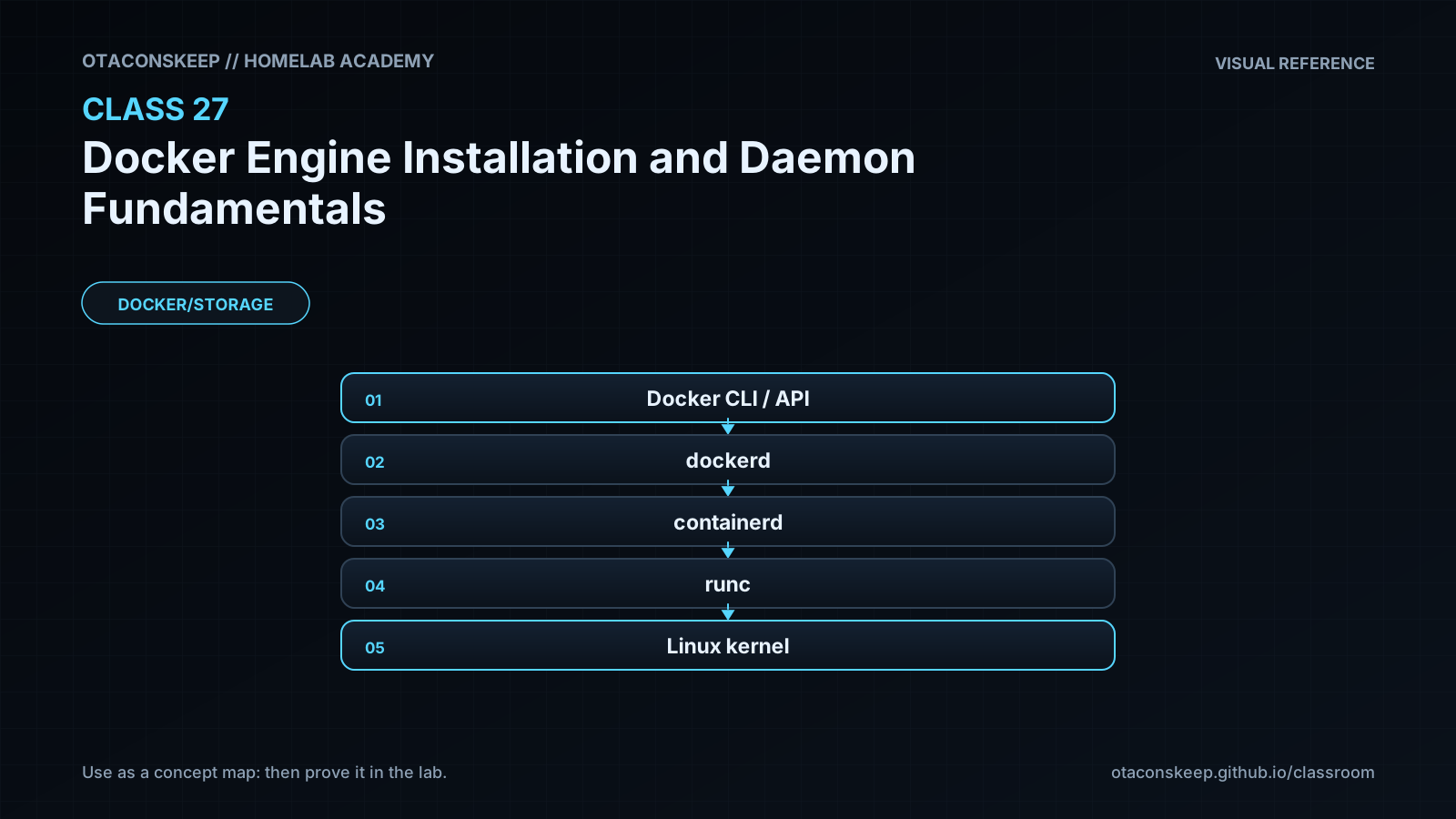
Docker installation is more than placing a client binary on a host. A functional deployment normally includes the Docker CLI, the dockerd daemon, containerd, an OCI runtime, service definitions, and supporting networking and storage components. When a user runs a docker command, the CLI sends an API request to a daemon. On Linux, that request commonly travels through a local Unix socket. The daemon resolves images, prepares storage and networking, asks containerd to manage the container lifecycle, and ultimately relies on an OCI runtime to create the isolated process. This separation explains why a client can be installed while the daemon is missing, stopped, inaccessible, or located on another system.
Choose an installation source deliberately. Vendor-maintained repositories usually provide current Docker Engine packages and documented upgrade paths. Distribution repositories may integrate well with the operating system but can carry different versions or packaging decisions. Static binaries require the operator to manage service integration and updates. Convenience installers reduce setup effort but are less appropriate when reproducibility, review, and package provenance matter. Rootless mode can reduce dependence on a privileged system daemon, but it has prerequisites and operational differences that must be evaluated rather than assumed away. Record the chosen source, package names, repository signing mechanism, supported operating-system release, architecture, expected version, and rollback procedure before installation.
The host service manager commonly launches dockerd, tracks its process, captures logs, and applies startup dependencies. A daemon can fail even when package installation succeeds. Frequent causes include invalid JSON, options duplicated between startup arguments and daemon configuration, unsupported directives, storage-driver problems, stale process metadata, insufficient disk space, or an occupied API endpoint. Diagnose from the service status and daemon journal before repeatedly restarting it. Repeated retries can obscure the first and most useful error.
Daemon settings should be treated as controlled infrastructure configuration. Validate JSON first, then use dockerd's configuration validation feature when supported by the installed release. Logging must be bounded because unbounded container logs can consume the host filesystem. The local log driver and a rotation policy are reasonable subjects for evaluation, but production values must reflect application volume, retention requirements, and centralized logging design. The data root contains critical Docker state and must not be moved casually. Changing it without a migration plan can make existing images, volumes, and containers appear to disappear.
Access to the Docker API is highly privileged. A user who can control a rootful daemon can generally start containers with host mounts and other capabilities that lead to host-level control. Membership in a local access group should therefore be governed like administrative access. Do not expose an unauthenticated daemon API over a network. Remote administration should use an authenticated and encrypted mechanism supported by the deployment design.
This class does not install or restart Docker because those actions would modify the package database, service state, and system paths outside the permitted lab workspace. Instead, the learner inventories the host, creates an installation decision record, stages a daemon configuration whose paths remain inside the workspace, and performs read-only validation when the relevant tools already exist. A real installation should occur later in an approved maintenance window using the official instructions for the exact operating system and a tested rollback plan.
Architecture
request_flow
A user or automation process invokes the Docker CLI.
The CLI selects a Docker context and API endpoint.
The CLI sends an API request to dockerd, commonly through a local Unix socket.
dockerd applies authorization assumptions, configuration, image, network, volume, and container logic.
dockerd delegates container lifecycle work to containerd.
containerd invokes an OCI runtime to create or manage the isolated container process.
Container output is handled by the selected logging driver, while writable layers are handled by the selected storage driver.
control_plane
The Docker daemon and its API form the local container control plane. The service manager supervises the daemon, but it does not replace Docker's own API or state management.
data_plane
Container processes, virtual network interfaces, mounted volumes, image layers, and writable layers constitute the workload-facing data plane.
trust_boundaries
Between an operator and the Docker API endpoint
Between the daemon and images obtained from registries
Between container processes and the host kernel
Between persistent volumes and application containers
Between package repositories and the host package manager
lab_workspace
/opt/lab-classroom/class27/
staged_socket
/opt/lab-classroom/class27/runtime/docker.sock
staged_data_root
/opt/lab-classroom/class27/docker-data
Required reading
- Docker Engine installation overview: https://docs.docker.com/engine/install/
- Docker daemon configuration overview: https://docs.docker.com/engine/daemon/
- Docker post-installation guidance for Linux: https://docs.docker.com/engine/install/linux-postinstall/
- Docker Engine security overview: https://docs.docker.com/engine/security/
- OCI runtime specification overview: https://github.com/opencontainers/runtime-spec
References
- Docker Engine installation documentation: https://docs.docker.com/engine/install/
- Docker daemon configuration documentation: https://docs.docker.com/engine/daemon/
- Docker daemon command reference: https://docs.docker.com/reference/cli/dockerd/
- Docker Linux post-installation documentation: https://docs.docker.com/engine/install/linux-postinstall/
- Docker rootless mode documentation: https://docs.docker.com/engine/security/rootless/
- Docker logging configuration documentation: https://docs.docker.com/engine/logging/configure/
- Docker storage driver documentation: https://docs.docker.com/engine/storage/drivers/
- Docker security documentation: https://docs.docker.com/engine/security/
- containerd project documentation: https://containerd.io/
- Open Container Initiative runtime specification: https://github.com/opencontainers/runtime-spec