FILE // FOXDIE MEDIA INTEGRITY TIER // KEEP BLUEPRINT · REFERENCE
Keep Blueprintreference, not a standalone download

Engineering Case Study // Media Integrity Automation

FOXDIE

A module that watches a self-hosted media library, safely fixes what it can be certain about, and holds everything else for a human. The hard rule underneath it: nothing is ever permanently deleted without a 24-hour reversible window first. This page explains the architecture, the reasoning behind each decision, the safety model, and how to set it up on your own Keep-tier deployment.

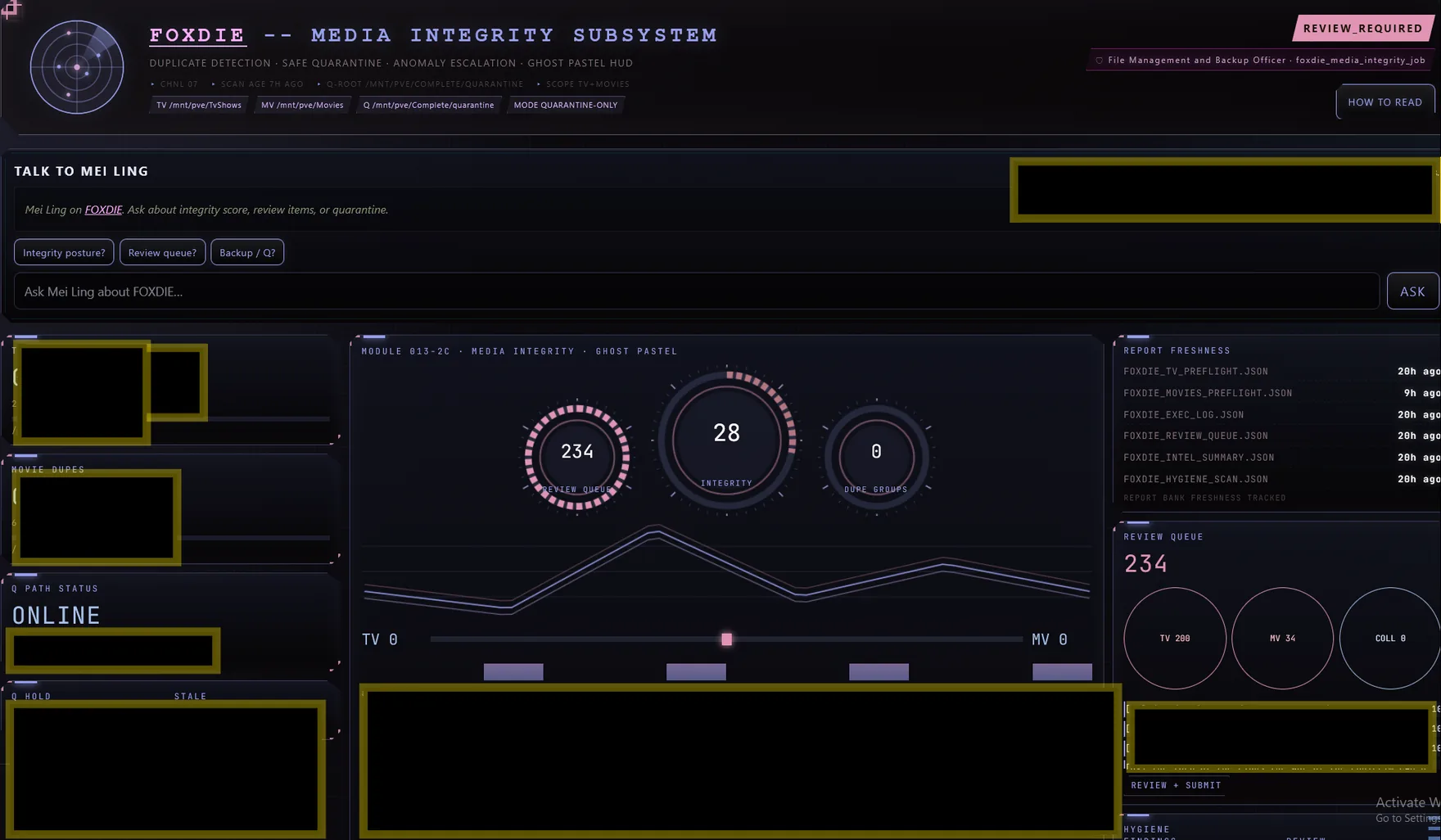
FOXDIE status panel inside the Keep, showing scan findings, triage verdicts, and the deletion hold queue
FOXDIE's panel inside the Keep. Findings, triage verdicts, and the reversible hold queue, all in one place.
Requires an existing Keep-tier deployment. FOXDIE is a module inside otacon-executor, not standalone software. It assumes you already run otacon-executor plus a Radarr/Sonarr media stack. It is not part of the free Otacon Core install, which covers identity, memory, chat, and voice only, with no media library management. If that isn't your setup, this page is still worth reading as a real example of how the Keep's automation-authority model works in practice, and why it draws the lines it draws.

Why this exists

Self-hosted media libraries rot quietly

Over months of requests, imports, and manual cleanup, a real library accumulates download-client leftovers, orphaned files, and duplicate copies. The one that actually costs you something is complete downloads that never got extracted: real movies and shows sitting as raw archive volumes because the automation that should have unpacked them failed, or never ran at all. Someone has to look at this periodically. Doing it by hand doesn't scale past a certain library size, and a script that "cleans up" on its own and guesses wrong will delete something you needed. FOXDIE takes the middle path on purpose: automate the part that's genuinely safe, and hand you a short, honest list for the part that isn't.

Architecture

Scan, classify, triage, self-fix, human review, deletion

Scan (read-only)→ Classify→ Triage→ Self-fix→ Human review (if held)

The only step that permanently deletes anything is deletion finalization, and it's deliberately kept separate from everything above it. Items triage marks are quarantined and placed on a 24-hour reversible hold first. Only if nobody reverses that hold does a later, independent sweep step remove the item for good. Every other stage in the pipeline (scan, classify, triage, self-fix) either only reads the library, or only takes an action that can still be undone. Splitting "decide" from "act permanently" into two separate steps, with a mandatory waiting period between them, is the whole safety model in one sentence.

What each stage actually does, and why it's shaped this way

  • ✓ Scan. A read-only pass over the library. It never moves or deletes anything, on purpose: the same scan results feed both the automated decisions below and the human review queue, so they need to be trustworthy on their own, independent of what happens next.
  • ✓ Classify. Every finding gets a category, and for identity questions (is this really the movie the folder says it is), a confidence score. Classification is separate from decision-making so the scoring logic can be tested and audited on its own.
  • ✓ Triage. The decision step. It reviews every classified finding and either marks it onto the reversible deletion hold, or holds it for a human. Only two narrow categories ever qualify for the first path. Every item gets a logged verdict either way; nothing is ever silently dropped or forgotten.
  • ✓ Self-fix. Extracts real movies and shows sitting unextracted as raw archive volumes, verifies a real video file resulted from the extraction, then leaves it for the normal *arr import scan to pick up. It never deletes the source archive itself. Leftover archive parts go through the same 24-hour hold as everything else, not a shortcut.
  • ✓ Human review. Where anything triage or self-fix couldn't be confident about ends up. For most real hygiene findings, corrupt files, unmanaged files, and wrong-type files especially, landing here every single time is the intended outcome, not a shortcoming to fix later.
  • ✓ Deletion finalization. The only permanent-delete path in the whole system. It runs on its own short interval, acts only on items triage already marked, and only after the 24-hour hold has fully elapsed with no reversal.

Safety Model

What's automatic, and what's protected

FOXDIE doesn't have its own permission system. It uses the same authority model as every other autonomous agent in the Keep, because a second, module-specific set of rules would just be another place for a gap to hide. That shared model draws one hard line: a short, explicit list of actions and domains that are never automatic, no matter how confident the system claims to be.

Always automatic (safe, reversible)Always stops for a human
Inspect and classify every file in scopeCorrupt, unmanaged, or wrong-type findings outside two narrow, verified-safe categories
Dismiss known false positives, with a logged reasonAny folder with more than one candidate archive set (ambiguous, never guessed at)
Attempt known-safe archive repairs (extract and verify, never deletes the source)Archive extraction failures, such as non-standard volume naming
Mark two narrow hygiene categories onto the 24-hour reversible holdLow-confidence identity candidates with no verified duplicate (could be a unique file)
Resolve collision anomalies through an explicit quality-score tiebreakPermanent deletion itself, until a 24-hour hold expires untouched
Report findingsAnything matching the hard-blocked list below

Hard-blocked, system-wide, not specific to FOXDIE: never automatic under any circumstance are destructive filesystem operations at the system level (delete, overwrite, wipe, truncate, purge, format), and anything touching credentials, authentication, DNS, firewall rules, or finance. FOXDIE's own deletion path is built to satisfy this even though "remove a file" sounds like it should qualify on its own: it never performs a bare delete. Everything goes through the 24-hour reversible hold first, every time, with no exception path.

From the module's own decision-policy notes, written after a real incident: checking 74 "possible junk" findings by hand found that 59 of them were actually complete, legitimate downloads that the scanner's narrow video-format check simply didn't recognize as valid. Deleting those on scanner confidence alone would have destroyed real, finished downloads. That single incident is why identity-uncertain and quality-uncertain findings are never auto-deleted, at any confidence level, full stop.
Default Schedule

Scan, then decide, then act: three separate clocks, on purpose

TimeStepWhy then
3:00 AMScanRead-only and short, so it runs on the shared internal scheduler alongside other quick daily jobs without slowing anything down
3:10 AMTriageEnough of a gap for the scan to have finished and its review queue to be built; runs on its own dedicated schedule rather than the shared one, explained below
3:25 AMSelf-fixScheduled after triage so the day's decisions are recorded in the log before any action runs, keeping the daily record easy to read in order
Every 30 minutesDeletion finalization (sweep)Runs often because it only ever acts on items whose 24-hour hold has already fully elapsed. There's nothing time-sensitive about checking frequently, and checking often means nothing sits finished-but-unswept for long

Why triage and self-fix get their own schedule instead of sharing the same internal scheduler as everything else: the shared job scheduler polls on a short interval and runs each due job in sequence, in the same process. That works fine for jobs that finish in seconds. Triage and self-fix can take several minutes on a large library. Running a multi-minute job inside that shared, single-threaded loop would stall every other unrelated scheduled task, reminders, alarms, and backups included, for the whole duration of the run. Giving the slow jobs their own independent trigger avoids that entirely. It's a small, unglamorous architectural choice, and it's the kind of thing that quietly matters a lot once something actually depends on it.

Verification

"The files exist" is not the same claim as "it's running"

This is the single lesson behind the whole page: a route, a module, and a scheduled job can all be individually correct, and the feature as a whole can still do nothing, because nothing ever actually invoked the working parts, or because a dependency the code expects turned out to be silently missing from the running environment. So FOXDIE's health check doesn't stop at confirming the code is present. It confirms each stage actually produced a fresh result recently.

curl -s http://localhost:5757/foxdie/status | python3 -m json.tool

This returns whether the module loaded, whether the archive-extraction dependency is actually present rather than just declared in a build file somewhere, and separately for scan, triage, self-fix, and sweep, whether each one produced a result inside its expected freshness window. A stale or missing result fails the check, even if every individual route still returns a normal response when called by hand.

Setup // For an existing Keep-tier deployment

Enable and verify FOXDIE

This assumes otacon-executor is already running with the foxdie package present in the image. The script below configures the three pieces that have to work together (the archive-extraction dependency, the daily job chain, and the deletion-finalization sweep), then proves each one actually ran, rather than just confirming it's configured.

curl -fsSL https://otaconskeep.github.io/downloads/install-foxdie.sh -o install-foxdie.sh && chmod +x install-foxdie.sh && ./install-foxdie.sh

Safe to re-run any time. Every step checks the current state first and skips whatever is already correct. To check without changing anything, add --verify-only. Full source is on GitHub.

Idempotent No destructive steps Verifies before claiming success Pass/fail per check

Troubleshooting

What actually goes wrong, and how to fix it

SymptomCauseFix
Triage logic exists and works fine when called by hand, but nothing changes day to dayThe code is correct, but nothing ever schedules it. Writing a feature isn't the same thing as wiring it into the scheduleRun the setup script above. It adds the missing schedule entry and triggers one real run to prove it works
A dependency was added to the build file, but the feature that needs it still failsThe running container predates the change. Editing a build file has no effect on an instance that's already runningInstall the dependency live in the running container, which the setup script does automatically, then rebuild the image so a future restart doesn't lose it again
Archive extraction fails on one specific multi-volume setSome release groups don't follow the standard multi-volume naming convention the extraction tool expects, so it can't find the next volume on its ownNot automated, on purpose. This needs a human to either extract manually or confirm that a rename is safe. Renaming real files based on a guess is exactly the kind of action this system refuses to take unattended
An old alert still says "review required" long after the review actually happenedThe review step didn't post a follow-up record when it finished, so the board never reflected the outcomeFixed in this build. The triage step now always posts a follow-up record, whether something was marked for deletion or not
General "the code looks right but it doesn't work"Image or dependency drift: a build file changed since the running container was last builtCompare the container's creation time against the build file's last-changed time, and rebuild if the container predates it

Disable / Uninstall

Turning it off

FOXDIE's code has no separate on/off switch. Disabling it means stopping the schedule, not removing the module itself.

./install-foxdie.sh --uninstall

This removes only the scheduled entries the setup script itself added. Because nothing FOXDIE does is destructive by default, there's no separate "undo everything" step needed. Anything still inside its 24-hour hold can be reversed individually, regardless of whether the schedule is currently active.

Engineering Lessons

Two reusable failure patterns

These are preserved here because they generalize well beyond this one module. Worth checking for in any new automation before calling it finished.

PatternWhat it looks likeHow to catch it
Built but never activeA working capability exists (a route, tested logic, a safe-by-design policy) but nothing ever invokes it. Every individual piece is correct; the feature as a whole does nothing.A status check that proves recent, successful execution, not just that the code or route exists.
Dependency or image driftA dependency gets added to a build file, but the running instance predates that change, so the feature silently fails despite the source code being correct.A runtime check for the actual binary or package's presence, plus comparing the running instance's build time against the build file's last-changed time.

The full write-up, including a real example from the day this module's automation gaps were found and closed, lives on the Engineering evidence page.